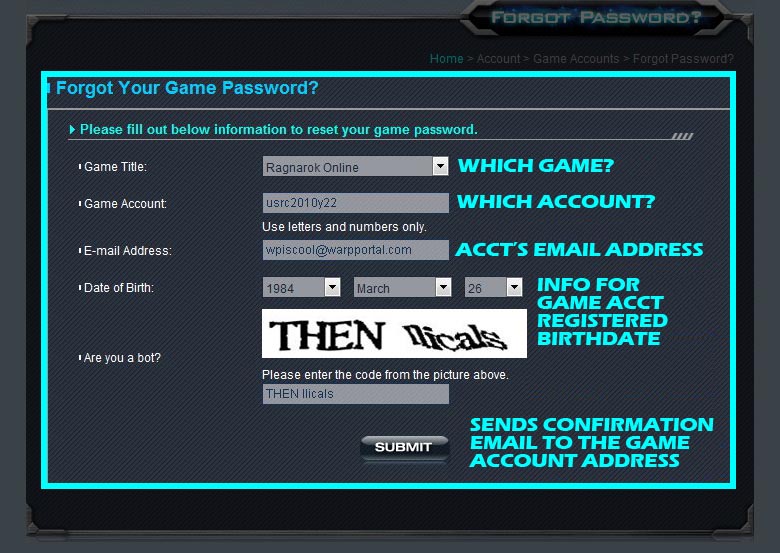
Step 8. Fill in the appropriate game information to confirm you are the appropriate owner of that account.
In all cases this step will send an Email to the Email address you put in the field. Confirming the Email you receive will bind the Game account to your WarpPortal account.
Note : All Ragnarok accounts have received automatic password radomization to prevent hostile/surprise account takeovers.
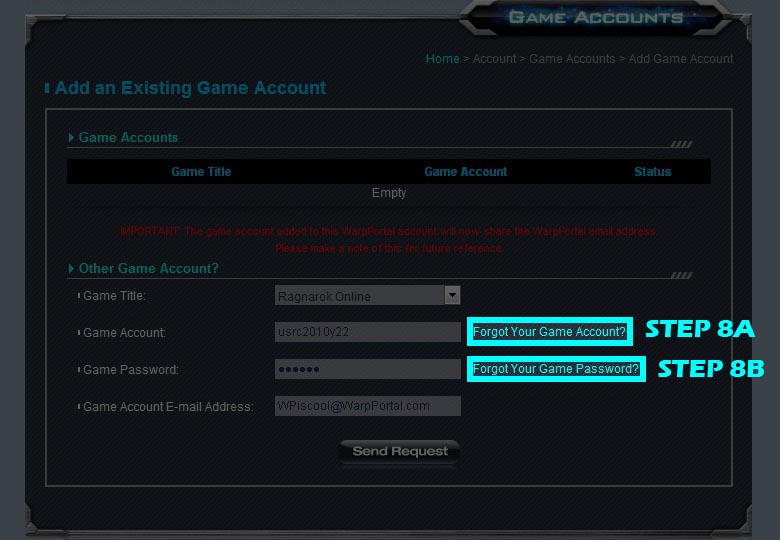
Step 8A. Filling out the information that you think was registered to the game account. An Email will be sent to the "Game's Email Address".
Fill in the game account name in the "Add an Existing Game Account" field.
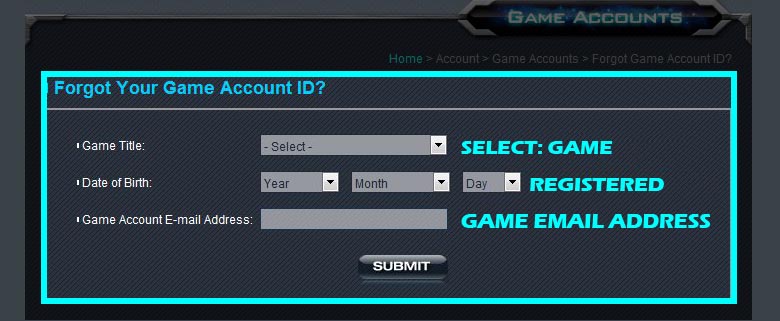
Possible Problems : If you do not know or have access to the old Email the game account is registered to, you won't be able to do the account recovery process.
Please submit a ticket to out SC team with all the game account information you do know, and what WarpPortal account Email you use so they can update the Email address so you can easily continue with the tieing to your WarpPortal account.

Step 8B. Filling in the information, and Submitting the information will send a confimation Email to the game's old registered Email.
You will need access to that Email address to click the link. You will be taken to an "Update Password" page which allows you to change the password.
Navigate back to the "Add an Existing Game Account" Page and fill in the now known information.